


The Virginian-Pilot
3.036.00 Reviews
App Specs
- Version
- 10.0.60
- Updated On
- License
- Free
- Downloads
- 10,000+
- Developer
- Tribune Publishing Inc.
- Categories
- News & Magazines
- Platform
- Android
Screenshots
 Analysis by AppCompare
When I want to follow what is happening around Hampton Roads, I need more than a stream of national headlines: I want local reporting that helps me understand what may affect my day. The Virginian-Pilot is a news app from Tribune Publishing Inc. built around that regional focus. I see its strongest case in making local coverage easy to check in short visits, while its value depends on whether you want this publication’s reporting and are comfortable with the app’s paid options.
Starting with a local question
A practical way to approach the app is to begin with a question rather than simply scrolling: What is happening nearby, and is there a story I should follow beyond today’s headline? That mindset suits a regional newspaper app better than expecting it to replace every source of news on your phone. I would use it alongside a broader outlet if I also wanted a wide national or international overview.
The Virginian-Pilot is free to install, and the app is rated for Everyone 10+. Its current version is 10.0.52 and requires Android 8.0 or later. The app has an average rating of 3.0 from around 60 ratings, with over 10,000 installs. Those figures give a rough sense of its audience and reception, but they do not tell me whether its local focus fits a particular reader; that is the more useful question to ask before making it part of a daily routine.
Following a story from first glance to next step
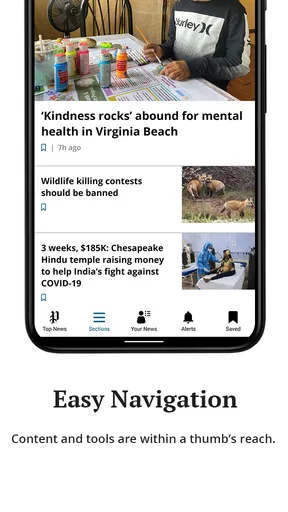
Downloading The Virginian-Pilot app was a breeze. Available on both Android and iOS, it took just a few moments to install. Upon opening, I was greeted with a clean and user-friendly interface. The design is intuitive, with everything laid out in a way that just makes sense. No clutter, no confusion—just straightforward navigation.
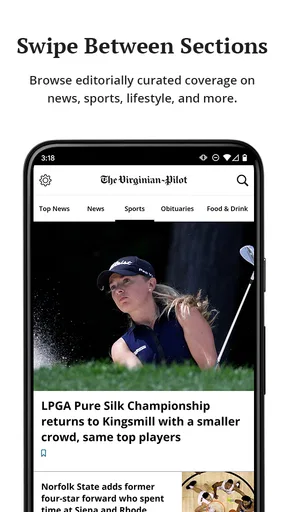
The app opens up to the main news feed, which is constantly updated with the latest stories. You can easily browse through headlines or dive deeper into specific articles. I loved how it’s organized—you can tell a lot of thought went into making it as user-friendly as possible.
Making the first check useful
In an everyday routine, I would scan the feed once in the morning, open the stories that matter to my plans, and return later only if a developing local issue warrants it. That is a more focused use than treating the app as an endless scroll. For example, someone planning a commute or a weekend outing can use local reporting as context, then decide whether a headline deserves a closer read before leaving home.
A useful habit is to separate “I need to know this now” from “I want to understand this later.” A headline can flag an event, while the full article can add the context needed to judge its relevance. I would avoid making decisions from a notification alone: opening the complete report is a better handoff from quick awareness to informed understanding.
Worth Reading Before You Choose

Flipboard Shows What News Apps Must Do Beyond the Feed

Switching to Android Auto Means Rethinking Your Driving Routine

Google Calendar Makes a Crowded Week Easier to Manage

Ludo King Makes the Most of the Minutes Between Plans

Baby Panda World Brings Quick Play to Modern Phones, but Its Game Library Feels Busy

ESPN’s Live Game View Makes Following Close Games Easier
Features That Stand Out
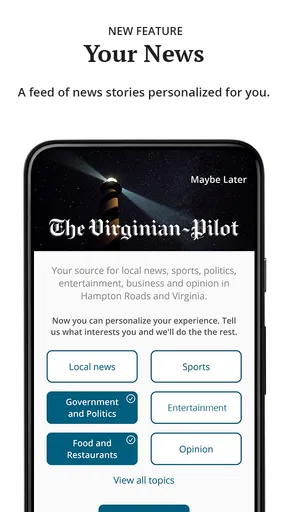
One of the coolest features is the ability to customize your news feed. You can choose which sections you want to see more of, whether it’s local news, sports, or entertainment. This personalization ensures that the content is relevant to your interests, which is a huge plus.
Another feature worth mentioning is the push notifications. They are timely and ensure you never miss out on breaking news. For someone who likes to stay informed without constantly checking their phone, this feature is a lifesaver.
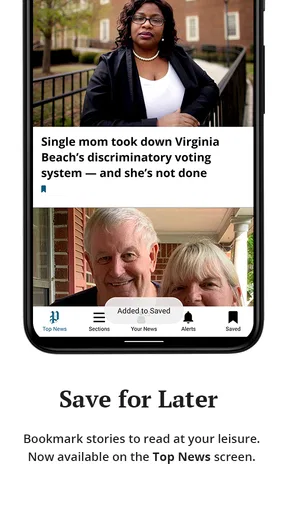
Offline reading is another nifty feature. You can save articles to read later when you don’t have an internet connection. This is perfect for those moments when you’re on a flight or somewhere with spotty service.
Choosing a sensible notification routine
Notifications are most helpful when they serve a clear purpose. I would keep them on if I wanted alerts about major local developments, but I would still check the feed on my own schedule rather than letting every alert dictate the day. If an alert arrives while I am busy, the saved-for-later option gives me a way to return when I have time; before travelling, I would save the specific articles I expect to need instead of assuming the whole feed will be available offline.
This workflow has a small but important trade-off: alerts can shorten the time between an event and my awareness of it, but they also compete for attention. If I only want a calm morning read, browsing the feed directly may suit me better than enabling notifications. Either way, I would treat the app as a way to keep up with coverage, not as a substitute for checking practical details from the relevant official source when a decision depends on them.
What the reporting is best suited to
The quality of the articles is top-notch. The journalists provide detailed reporting and cover a wide range of topics. From local happenings to national news, each piece is well-researched and written with clarity. The app also includes multimedia content such as photos and videos, which enrich the reading experience.
For those interested in more than just the headlines, the app offers in-depth investigations and special reports. These pieces provide a comprehensive look at important issues affecting the community, which I found to be both informative and engaging.
That mix changes how I would use the app: brief checks help me spot what is new, while longer pieces make more sense when I can give them proper attention. If I encounter an investigation about a community issue, I would read it as a starting point for understanding the local conversation rather than expecting a short summary to settle every question. The regional emphasis is the point; readers looking mainly for national breaking news may get more useful breadth from a general news aggregator or a national publication.
Moving from reading to sharing
News often becomes useful when it leaves the screen: a story may prompt a conversation at home, help a neighbour understand a local change, or give someone a reason to look for more detail. I would pass along the article itself when its context matters, rather than repeating a push alert from memory. That small handoff helps keep the headline connected to the reporting behind it.
For a household with different interests, feed customization can make the first screen feel more personally relevant, but it also creates a trade-off: narrowing the feed too much may hide a story that matters to the wider community. I would keep enough range to notice developments outside my usual interests, then use the full article to decide whether they deserve further attention. That balance is especially useful for readers who follow local news for both personal relevance and a broader sense of place.
User Experience and Accessibility
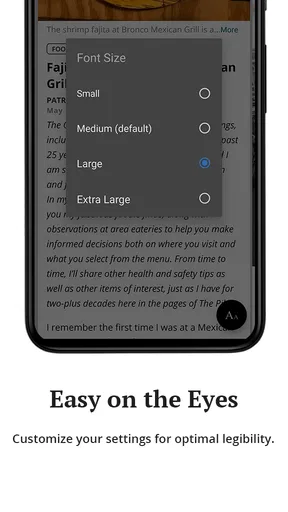
Navigating through the app is a smooth experience. The text is easy to read, and the overall layout is clean and modern. For those who need it, the app includes accessibility features such as adjustable text sizes. This ensures that everyone can enjoy the content comfortably.
What really struck me was how fast the app is. There’s no lag when loading articles or videos, which is crucial for maintaining an enjoyable reading experience. The developers clearly prioritized performance, and it shows.
Comfort matters during longer reading sessions as much as it does during a quick check. If small print makes an article tiring, adjusting text size can make it easier to stay with the story instead of giving up halfway through. I would also use saved reading as a practical bridge between a short break and a longer quiet moment, particularly when connectivity may be unreliable.
Where the routine can break down
The app is not automatically the right fit for every reader. If you live outside the area and rarely need Hampton Roads reporting, a national news app or a broad aggregator may offer more relevant coverage in one place. If your priority is a complete picture across many regions, this app’s local orientation is a strength for one purpose but a limitation for another.
Cost is another point to consider before settling into a routine. The app is free to download, but in-app purchases range from $7.99 to $199.99 per item. I would check the purchase details shown in the app before committing, and decide whether paid access makes sense for how often I expect to read. A casual visitor who only wants occasional headlines may have a different calculation from someone who regularly follows local investigations and community reporting.
There is also a difference between a smooth interface and a friction-free news habit. Notifications can interrupt, a saved article still requires you to remember to return to it, and a personalized feed can become too narrow if you only select familiar topics. I would review those choices after using the app for a while: keep alerts that genuinely help, remove distractions, and make sure the sections on screen still reflect what I want to know about Hampton Roads.
Readers often ask whether they need an account or paid access just to try a news app. The sensible first step here is simply to install it and explore the available experience before choosing any purchase; the free download makes that trial possible, while paid items mean the cost of deeper or continued use should be checked in context. I would also ask whether the app covers the kind of local stories I actually follow, rather than assuming that a regional title will match every neighbourhood or topic equally well.
Another practical question is whether it can replace a general news app. In my view, it works better as a complement for local coverage than as a single source for everything. Someone who needs a wide mix of national, international, business, and local headlines may prefer an aggregator for breadth and keep this app for regional reporting. Someone whose main interest is Hampton Roads has a clearer reason to make it part of the daily check-in.
Who will get the most from it
I would recommend it to people in Hampton Roads who want a convenient route into local news, and to former residents or interested readers who want to keep an eye on the area. The combination of a browsable feed, section choices, alerts, and saved articles supports different reading rhythms: a fast scan during breakfast, a deeper read later, or an article kept for a period without reliable service.
I would be more cautious about recommending it to someone who wants an entirely free, all-purpose news service, or who expects every local detail to be covered in the same way as a dedicated source for a specific community or subject. The average rating of 3.0 is a modest signal, not a verdict; I would use a short personal trial to judge navigation, relevance, and whether the available purchase options suit my needs.
Final Thoughts
All in all, The Virginian-Pilot app is a must-have for anyone living in or interested in the Hampton Roads area. It’s a convenient way to stay informed, offering high-quality journalism right at your fingertips. The combination of a sleek design, customizable features, and reliable content makes it stand out in the crowded field of news apps.
If you’re looking for a dependable source of news that’s both easy to use and packed with valuable features, give The Virginian-Pilot a try. It’s definitely earned a permanent spot on my phone!
My recommendation in context
My recommendation comes with one qualification: the app earns a place on my phone because of its Hampton Roads focus, not because it can replace every other way I follow the news. I would start with the free download, shape the feed around the subjects I actually read, and see whether the reporting is useful often enough to justify any in-app purchase. If local coverage is part of your everyday life, that is a fair test; if it is only an occasional curiosity, a broader free news source may be enough.
The practical result is a straightforward local-news workflow: notice a headline, open the reporting for context, save a piece when the timing is wrong, and share the full story when someone else needs the detail. For me, that is where this app makes sense. It is most rewarding when I want to stay connected to Hampton Roads, and less compelling when I need broad coverage beyond the region.
Pros
- User-friendly interface with intuitive navigation.
- Comprehensive coverage of local news.
- Regular updates keep information current.
- Customizable notifications for breaking news.
- High-quality images and multimedia content.
Cons
- Limited offline access to articles.
- Occasional ads disrupt reading experience.
- Subscription required for premium content.
- Some sections load slowly on older devices.
- No dark mode option available for night reading.
FAQs for The Virginian-Pilot
What is The Virginian-Pilot app and what features does it offer?
The Virginian-Pilot app is a comprehensive news application that provides users with up-to-date local news, sports, weather updates, and opinion pieces from the Hampton Roads region. It offers features like customizable notifications, live news updates, and access to multimedia content, ensuring you stay informed about the latest happenings in your community.
Is The Virginian-Pilot app free to use, or is there a subscription fee involved?
The Virginian-Pilot app is free to download, but it offers both free and premium content. To access certain articles and features, a subscription may be required. The app provides various subscription plans that offer full access to all articles, exclusive content, and ad-free browsing, enhancing your reading experience.
How user-friendly is The Virginian-Pilot app for first-time users?
The app is designed with a clean, intuitive interface, making it user-friendly for first-time users. It offers easy navigation with clearly labeled sections such as news, sports, and weather. Additionally, it provides a search function and customizable settings, allowing users to tailor their news feed according to their interests.
Does The Virginian-Pilot app offer offline reading options?
Yes, The Virginian-Pilot app supports offline reading. Users can save articles to read later when they are not connected to the internet. This feature is particularly useful for those who want to catch up on news during commutes or in areas with limited connectivity, ensuring uninterrupted access to information.
Are there any specific device requirements for installing The Virginian-Pilot app?
The Virginian-Pilot app is compatible with both Android and iOS devices. It requires Android version 5.0 or later and iOS version 11.0 or later. Ensure your device meets these requirements for optimal performance. Regular updates are also recommended to access new features and improvements.


